Choose Who Can Use HttpWatch
HttpWatch can be installed either for your Windows account only or for everyone who uses the computer.
Install for the Current User (Default)
For a new installation, starting the installer normally installs HttpWatch for your Windows account. Setup does not normally display the Install Mode page or require administrator rights, and HttpWatch is available only when you are signed in to that account.
Install for All Users
To make the option to install for everyone available, use either of these methods:
- Start the installer from a command prompt with the /all-users=1 command line option
- Right-click the installer and select Run as administrator
Setup then displays the Install Mode page with All Users - install for everyone on this computer selected by default:
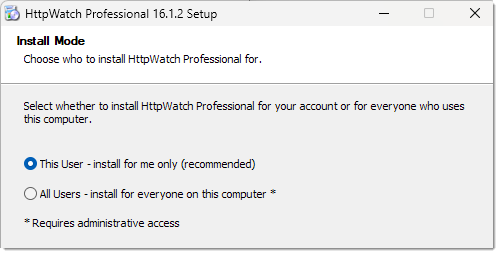
For a new installation, either method initially selects installation for everyone; choose This User on the Install Mode page if you instead want to install only for your account. Installing for everyone requires administrator rights. Run as administrator supplies those rights before Setup starts, while Setup requests them after you confirm the default choice when /all-users=1 is used from a non-elevated command prompt.
When updating an existing installation that is already available to everyone who uses the computer, the installer always displays the Install Mode page with All Users selected. Administrator rights are required for either choice because Setup must update or remove the existing configuration for everyone on the computer.
Silent and Managed Installations
For unattended deployment, see Silent Install. In silent mode, /all-users=1 directly selects installation for everyone and Setup must already be running with administrator rights.